As your online project grows, one question inevitably appears: “Should I stay on shared hosting or move to a VDS or dedicated server?” If you are serious about your website or SaaS product, you’ve probably already asked: “What is a VDS server?” and “Is it really that different from shared hosting?”
In this guide, we’ll explain in clear, practical language what a VDS server is, how it works, how it compares to shared hosting, and in which scenarios it makes sense to upgrade. No unnecessary jargon, just the key technical points and real-world use cases.
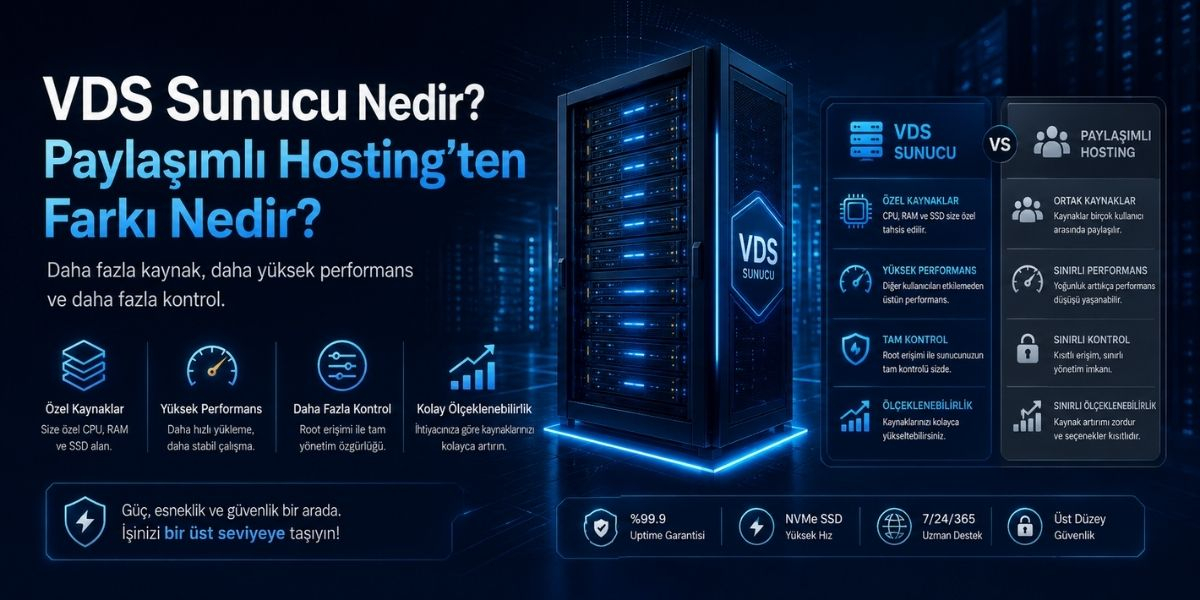
A VDS (Virtual Dedicated Server) is a virtual machine created on top of a physical server using virtualization technologies. The physical machine’s resources (CPU, RAM, storage, network) are split into multiple isolated virtual servers, and each VDS gets its own guaranteed share of resources.
In simple terms:
On shared hosting:
All websites share the same resource pool (CPU, RAM, disk I/O).
If another website on the same server consumes too many resources, your site may slow down.
On a VDS server:
You get dedicated CPU cores, RAM, and disk space assigned to your virtual server.
Other customers’ traffic spikes or bad configurations have far less impact on you.
You can manage your own operating system, software stack and security settings.
This makes VDS an ideal middle ground: it is more powerful and flexible than shared hosting, but more affordable and lighter than a fully dedicated physical server.
To clearly understand “VDS server vs shared hosting”, let’s break down the key differences.
Resource Isolation and Guarantees
Shared hosting:
CPU and RAM are shared across hundreds of websites.
You usually have soft limits, but you never truly own the resources.
VDS:
You receive a fixed amount of CPU cores and RAM reserved for your virtual machine.
Your performance is much more predictable.
Level of Control and Management
Shared hosting:
You manage only your website through a control panel like cPanel or Plesk.
No root access, no deep server-level configuration.
VDS:
Full root or administrator access.
You choose the OS (Linux/Windows), web server (Apache, Nginx, LiteSpeed), firewall rules, caching layers and more.
Performance and Scalability
Shared hosting:
Ideal for small blogs, personal websites and low-traffic business pages.
When your traffic and database queries grow, you quickly hit resource limits.
VDS:
Handles higher traffic, more complex applications, e-commerce, APIs, game panels, etc.
You can scale vertically by upgrading CPU, RAM or storage.
Security and Isolation
Shared hosting:
If other sites on the server are poorly secured, they can sometimes increase the attack surface.
VDS:
You design your own security policies.
Custom firewall rules, intrusion protection (fail2ban, IDS/IPS), non-standard ports and strict access control are all under your control.
Pricing
Shared hosting:
Cheapest option, perfect for beginners and very small sites.
VDS:
More expensive than shared hosting but much cheaper than a dedicated server.
Excellent balance between cost, control and performance.
There are several reasons why many growing websites and apps migrate from shared hosting to a VDS server:
More consistent performance
Your site runs on dedicated resources.
Campaigns, seasonal spikes and sudden traffic bursts are handled more reliably.
Greater flexibility
You can install custom software, specific versions of PHP, Node.js or Python, caching servers like Redis or Memcached, and background workers.
You are not limited to what the shared hosting provider pre-installs.
Better security posture
With root access, you can harden your system exactly as needed.
From firewall rules to SSH keys, every layer of security is customizable.
Professional hosting environment for agencies and SaaS
Agencies can host multiple client projects in isolated environments on a single VDS.
SaaS products and APIs benefit from the ability to fine-tune the stack and resources.
A VDS is not always necessary. In many cases, shared hosting is perfectly fine, especially if:
You run a small blog or personal website with low daily traffic
Your corporate website is mostly static and doesn’t execute heavy tasks
You are just starting your project and want to test the market with minimal cost
You don’t have complex backend logic, background jobs or heavy database activity
Shared hosting can cover all of these scenarios with a much lower budget.
However, it’s usually time to consider a VDS when:
Your site regularly hits CPU/RAM limits
Your provider keeps sending “resource overuse” warnings
Your site slows down or crashes during campaigns, influencer traffic or ad spikes
You need custom software, background workers, queues or APIs
Once you understand what a VDS server is, the next question becomes: “Which VDS plan should I choose?”
Some practical criteria:
CPU and RAM
Start with at least 1–2 dedicated CPU cores and 2–4 GB RAM for serious projects.
More intensive applications (large e-commerce, busy APIs) may need more.
Storage Type (SSD / NVMe)
Always prefer SSD or NVMe for faster database operations and better I/O performance.
NVMe is ideal for very high I/O and low latency.
Network and Location
Pay attention to network speed (e.g. 1 Gbit/s), bandwidth caps and server location.
Choose a location close to your main audience for lower latency.
Backups
Make sure there is a reliable backup strategy: daily/weekly backups, offsite storage, easy restore options.
Managed vs Unmanaged
Managed VDS:
The provider helps with OS updates, security hardening, panel installation and monitoring.
Ideal if you don’t have strong sysadmin skills.
Unmanaged VDS:
You are fully responsible for installation, updates and security.
Suitable if you are experienced or have a dedicated admin.
In summary:
Shared hosting is great for beginners, simple websites and low traffic projects.
A VDS server is the next logical step when performance, security and flexibility become critical for your business.
If you understand what a VDS server is and clearly define your project’s needs, choosing between shared hosting and VDS becomes much easier. Start small if you’re unsure, monitor your growth, and upgrade to a VDS when your traffic, complexity and business goals demand more power and control.

 Turkey (Türkçe)